Showing posts with label EAI. Show all posts

Thursday, June 7, 2012

User Keys & Blind Insert

If ignorance is bliss, why aren't there more happy developers?


Recently I found something strange in our inbound integration. For Upsert scenario we received XML data in all Upper Case format. Despite having CaseInsensitive setting set to TRUE for EAI Object Manager the integration was failing. It was because of the fact that user keys are always case sensitive irrespective of setting at OM level.

As a workaround for this we can either use "Force Case" field property at BC level or we can have numeric user keys. 

Another interesting user property we came across insert unique-user-key scenario is "SuppressQueryOnInsert" at IC level to do blind insert. This is real performance boost in scenarios when you are sure incoming user keys will always be unique. Without this user property Siebel first generates SELECT statement which queries for the record with given user key across the table. This user property helps in suppressing this SELECT statement and thus improves the performance by some mile.

Happy Integration!!

Monday, November 21, 2011

Session Management WebServices

This post is for one who has been bamboozled by below interview question.


Question: "Can we have dynamic users for Created By/Updated By fields during upsert operations instead of SADMIN in siebel inbound webservices using standard authentication mechanism? "
Soln: Yes we can, provided we are running a version 8.0.0.4 or higher. Stateless session management siebel authorization is key here in the inbound services.
Below setup is required in order to make this thing work.


1 - SessionAccessService and SiebelUserProfileService - These two webservices should be active and point to correct object manager. They should use sesssion management(i.e WSSOAP = 1) mode. The authentication type for all the methods should be set to None.

2 - Import wsdl and Consume SessionAccessService WS. Make a call to SessionAccess service and obtain the session token for a new Siebel User Session. For this PING method is used. The SessionToken value from the response message represents the unique Session Key that is associated with the newly authenticated and established connection for the SADMIN user. This token will be resused in subsequent requests. 

3 - Import wsdl and Consume SiebelUserProfileService WS. Using the session token obtained in previous step call method "SetContactContext" of the SiebelUserProfileService. In order to maintain context it is critical to pass SessionToken key. We should also pass the input argument "Login Id" of the user 
of which we want to set the context. "SetContactContext" method is added to "SiebelUserProfileService" business service as part of ACR - 385. 

4 - Now once the proper context has been established, upsert call to the desired entity should be made using the original SessionToken Key within the SOAP Header section. check the thin client for the magic as updated by will display the new user login instead of user used to login object manager. 

I hope it helps you make more comfortable when someone asks this question . 

Happy Integration!!


Wednesday, May 11, 2011

Removal of Null Tags

A lot has been said and written about removing null tags in xml messages. Any integration ace will always suggest to go for XSLT to transform XML while an siebel eScript enthusiast will defend stating business service will be ideal way to achieve this. But a laggard like me is always in search of solution which is easier to implement and flexible enough to handle frequent changes. After peppering siebel forums one of my friend came up with devilicious idea of using the data mappers itself to remove the null tags.

As per siebel booskshelf:

"The Integration Component Fields list displays the list of fields for that component. Note the system fields Conflict Id, Created, Id, Mod Id, Updated, operation, and searchspec in the list. This setting prevents the EAI Siebel Adapter Query and QueryPage method from outputting these fields."

It says that system fields are not the part of output XML. Any integration field of type "System" is not included in the ouput siebel message of EAI Siebel Adapter. So key here is, if the tag is null we can replace it in datamapper with any system field.

Consider a scenario if description is blank in Service Request then we don't want Description Tag send to external system in the outbound message. In order to remove the null tag we can use following expression in the DataMap:

IIF([Description] IS NULL,[Created],[Description])

In this Description and Created are integration fields of IC. Created is of type System, so if description is coming as null then we are passing Created. Here as Created is system field it will not come up in the ouput message after conversion. Now one may say how to remove entire instance if all the tags are null. Siebel also has solution to that. Try out Source Search Expression for this scenario.

Happy Integration!!

PS: Watch Out for Vinay's world for XSLT to filter out null tags.

Tuesday, May 3, 2011

"Siebel-Authored" flag in Data Map

Lot of things in siebel are still not documented. Talk about those magical user properties or custom classes with super natural powers, most of them needs to be discovered by trial only. Recently while working on the Siebel ASI, my eyes started gleaming when i saw "Siebel-Authored" flag in Data Map editor screen. My initial hollow guess was this flag might be used by siebel to identify predefault data mappers which are used by ASI. But after checking in sample i confronted that this flag was blank for all records.

Out of curiosity i started searching for usage of this flag but was not able to hunt down much. Please feel free to add comment in case you have any clue about this flag.

Happy Cracking!!

Thursday, April 21, 2011

Hierarchy Extraction ++

This is an extension to my previous post regarding Hierarchy Extraction which compares different ways to extract property sets. I have quoted in the earlier post regarding the length limitation(75 characters) of Workflow Utilities echo method using dot notation. But Siebel never run out of altervatives and each one gives me something different.
In order to overcome the length limitation of the dot notation one can make use of "Aliases" which lasts upto 255 characters. Workflow Processes can have Process Properties of type "Alias" (ignorant me). Basically this data type acts as a pointer to a specific attribute inside a Property Set. So in order to fetch Sr Number or Account Id, mentioned in previous post, we have to define two process properties of data type "Alias" with Default value as below

SR Number: SiebelMessage/ListOfService/Service Request/@SR Number

Activity Id: SiebelMessage/ListOfService/Service Request/ListOfAction/Action/@Activity Id

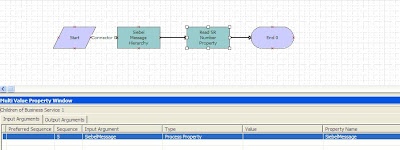
In the workflow in order to get the values from siebel message we need to pass input/Output variables as shown below:

Input Arguments


Output Arguments


The other advantage of using Aliases is that it doesn't error out reading a non-existing attribute from a Property Set.

Happy Extracting!!

Sunday, April 10, 2011

Access control with EAI Siebel Adapter

User properties in siebel are as thrilling as gadgets in bond movie. Yes, we can define visibility view modes at integration object level. "ViewMode" user property defined at IC level does the magic. This user property can take different values, as defined by LOV type "REPOSITORY_BC_VIEWMODE_TYPE".

However,as i keep saying the beauty of siebel is the flexibility it provides. One can even use "ViewMode" input argument in the Query/Query Page methods of "EAI Siebel Adapter" business service. However this argument is not exposed in the tools but one can use it. We can see presence of this argument in Query method of another business service "XMLP Siebel Adapter", which is used in the BIP reporting. This BS can also be used to extract the siebel message.

Happy Crunching!!

Tuesday, April 5, 2011

Hierarchy Extraction

Blue is the color of champions and so is the color of siebel. After a month of ups and down services return to normal as cup is brought home,so as me. Time to talk some business now. There are numerous instances in the integration where extracting a hierarchy or reading a property set is required. This could be accomplished in multiple ways. Here we will discuss the plus and minus of different services which can be utilized to perform desired task.
Lets consider an Integration Object with a simple hierarchy with Service Request being parent and Activity being child. Our main aim is to extract SR Number and Activity Id in the hierarchy. Potentially there could be multiple ways to extract property set but here we will discuss most commonly used business services.


1 - Workflow Utilities(My favourite) - This is one of the most powerful business service given by siebel and can do wonders. After using in n number of scenarios still i am not sure what all things this gem can do. "Echo" method can be used to extract any sub-hierarchy or read any property set from hierarchy.

Usage: In the workflow We have extracted siebel message in the SiebelMessage hierarchy. The Input to this business service will be the hierarchy and in the output argument we need to define the exact hierarchy path of SR Number, i.e. "SiebelMessage.ListOfService.Service Request.SR Number"

Input Arguments


Output Arguments

Advantage:
  • Ease of use.
  • Allows Multiple extraction of property set in one go.
  • In case we have multiple child and we have defined any property set to extract it fetches the first child instance in the hierarchy. Consider if we have to extract Activity Id in the above hierarchy and there are two activities for the SR then it will fetch the activity id of first instance. The hierarchy path defined will be "SiebelMessage.ListOfService.Service Request.ListOfAction.Action.Activity Id".

Disadvantage:
  • It allows only 75 characters in the output argument as a result sub-hierarchy extraction is required to reach destination property set.
2 - PRM ANI Utility Service - This is one of the most commonly used business service for hierarchy extraction."GetProperty" is the method which does the trick.

Usage: It takes the IO hierarchy structure and Property Name as input and returns value as output.

Input Arguments


Output Arguments


Advantage:
  • Easy to use as IO hierarchy is clearly defined in system
Disadvantage:
  • It returns only one property value per step. We can't read multiple property sets in one go.
  • If there are multiple child record instances under same tag name in hierarchy then this BS throws an error.
3 - FINS Industry XML Query Service - This is one of the lesser documented BS but can be effectively used for XML hierarchy extraction. We need to have XML hierarchy in place before we extract any property set. The real charm lies in the XPath notation which is used to specify the location in XML hierarchy.

Usage: It takes input as XML hierarchy along with the input arguments defined which needs to be extracted.

Input Arguments


Output Arguments


Advantage:
  • It takes destination property location as XPath notation, which gives more flexibility in defining the destination and thus character limitation constraint could be avoided.
  • Allows Multiple extraction of property set in one go.

Disadvantage:
  • It fails to fetch value in repeated instances of IC's, i.e. in case of multiple child instances with same tag name.
So, we have a choice which one to avoid based on our requirements. Comments are welcome here if anybody can add more to the advantages/disadvantages list.

Bleed Blue!!

Tuesday, January 4, 2011

Inbound Web Services

Web Services is one of the illusive part of siebel CRM. A lot has already been written about web services but for this category more is always less. This post is not about how to create inbound web service but to help you decide how to use them based on different scenarios.

Siebel makes use of UserName token mechanism for authentication and security. Based on the requirement following options are supported while implementing an inbound web service:

1 - The basic implemenation allows the userid and password to be included in the url of webservice. This can be opted when security is not of much importance.Following is an example of passing the user name and password by way of a URL:

http:///eai_enu/start.swe?SWEExtSource=WebService&SWEExtCmd=Execute&Username=SADMIN&Password=SADMIN
If you look at the "WebService" named subsystem it will have following parameters:

AllowAnonymous = False
Impersonate = FALSE

Along with this, make sure the operations have the Authentication Type set to None.

2 - We can also use the UserName tokens where security comes into picture. In this case the URL does not reveal the user credentials. In this instance url looks like as below:

http:///eai_anon_enu/start.swe?SWEExtSource=SecureWebService&SWEExtCmd=Execute

It makes use of "SecureWebService" subsystem. If you look at the "SecureWebService" named subsystem it will have following parameters:

AllowAnonymous = False
Impersonate = True

The operations have the Authentication Type set to "Username/Password - clear text". This type requires the SOAP client to send security header information along with the request. This header information contains the userid and password.

3 - There are times when you don't want exteral system to send the userid and passwords. siebel provides us a way to create totally anonymous web service so that no credentials are required to invoke service. A sample web service url looks like:

http:///eai_anon_enu/start.swe?SWEExtSource=AnonWebService&SweExtCmd=Execute

We need to have a new NamedSubsytem "AnonWebService" with following parameters:

AllowAnonymous = TRUE
Impersonate = FALSE

Along with this, make sure the operations have the Authentication Type set to None.

Details of how to create anonymouse web service are given under support Id: 601681.1

If security is of the utmost importance, and if it is critical that the password not be provided in clear text, web services over HTTPS should be used. We will discuss more of Outbound scenarios in the upcoming posts till then keep discovering unlimited possibilities of web services.

Tuesday, September 28, 2010

Generating unique numbers in DataMap

Sometimes data coming in inbound integration from external system cannot be uniquely identified.Similar scenario struck me and was forced to generate unique number at siebel side. One of the option was to parse incoming XML and add unique identifier using Scripting or XSL. Another option was to use "SIS OM PC Service" business service in datamaps and the generated output row_id could be used as user key during the insertion. In the field map following expression is used:
InvokeServiceMethod("SIS OM PC Service", "Get Next RowId","Test='123'" ,"RowId")

However the enigma was not ended here. Further twist was error "Access denied to invoke business service 'SIS OM PC Service' for search specification 'InvokeServiceMethod("SIS OM PC Service", "Get Next RowId","Test='123'" ,"RowId")'" . After some hunting on the support web i realised this security issue. In order to use any business service with InvokeMethod we need to define that business service at following places:

1 - Mobile Web client/Dedicated client: In CFG we need to define following parameter
[Siebel]
BusinessServiceQueryAccessList = SIS OM PC Service

2 - Web Client: We need to define this in Parameter "Business Service Query Access" at enterprise or component level where it is being used.
Name:Business Service Query Access
Value:SIS OM PC Service

Help in need is help indeed thus any help on generation of unique numbers in siebel during inbound are really welcome.